

We just released Rover 2.0, with exciting new features. Rover is an open source tool for managing and automating coding agents such as Claude Code, OpenAI Codex, and Gemini CLI. It makes agents (and humans!) more effective by providing structured workflows and tools for increasing the quality of the code and documentation produced.
Rover is trivial to install and works great out of the box, but it is also highly customizable. You can build automations on top of it by creating your own workflows and connecting them to your projects using the new hooks system.
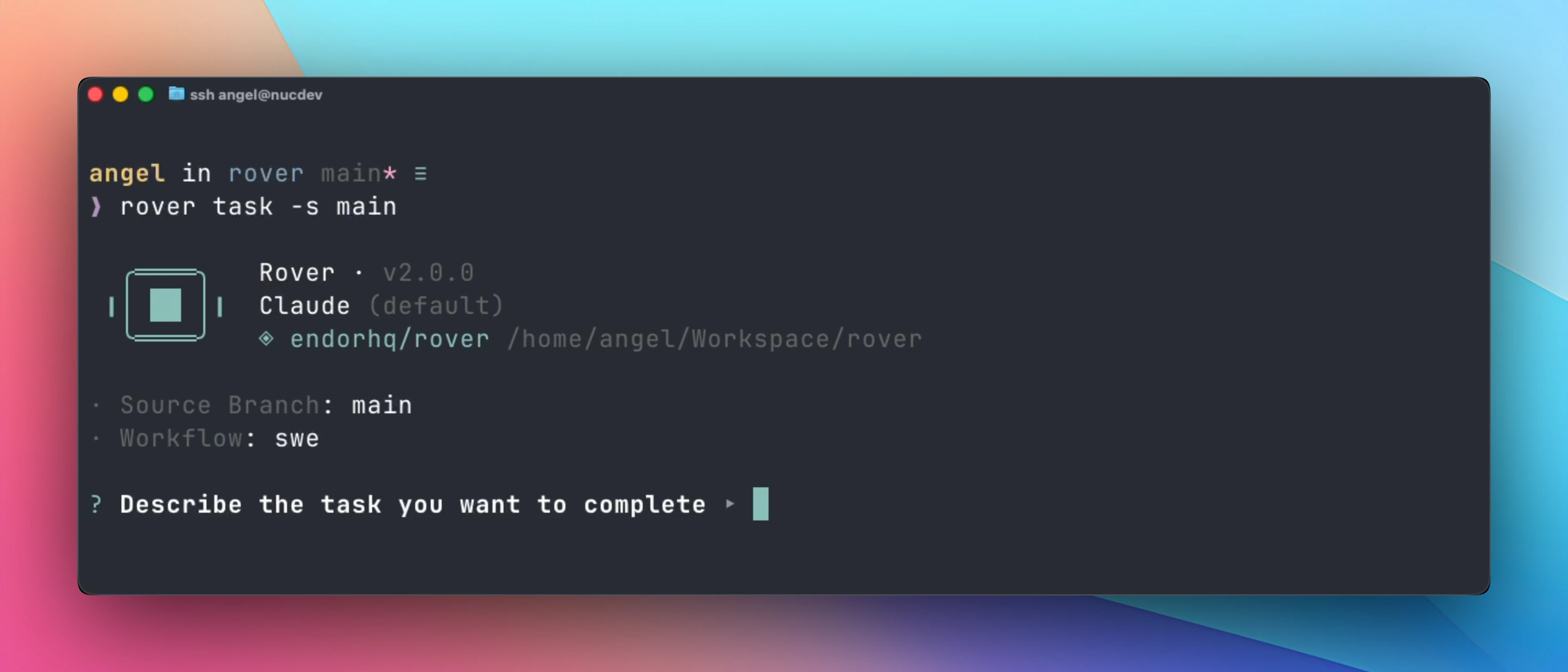
This new major release focuses on three areas:
- Multi-project support: Manage multiple projects at the same time. Rover now registers projects in a global store, so you don’t need to change your directory to a project anymore.
- Improved AI agent integration: We now use the Agent Client Protocol (ACP) internally, which means faster and more robust communication with agents and reduced token usage. This means adding support for new coding agents becomes easier, expect more news on this front soon!
- Custom workflows: Create new workflows tailored to your projects. From code review and security checks to any automation your project needs.
This release also includes several new features that were contributed by Ben Ullrich (GitHub), an engineer building automations with AI coding agents. Thanks to him, v2.0 includes:
- Hooks system: Configure and run custom scripts based on the Rover task lifecycle. For example, you can create a Pull Request once Rover finishes a coding task or add comments to a GitHub issue with additional context.
- External reference tracking (GitHub issues): Rover now stores a reference to the GitHub issue when you create a task from it (
rover task --from-github). Use it to build automations in combination with the hooks system. - Sandbox hardening and customization: Configure the network permissions to limit the URLs and IP addresses that AI agents can access when working on a task. You can also add extra arguments to the sandbox tool, like using a different container engine (via
--runtime) or using a specific network (via--network). - Remove non-relevant and sensitive files: Exclude non-relevant and sensitive files using patterns from the task workspace. AI agents won’t be able to access those files as they won’t be present in their dedicated workspace.
You can update Rover to this new version using the following command:
npm install -g @endorhq/rover@latestMoving to this new version should be painless. In any case, we recommend checking the Migrating to Rover v2 guide to understand the new changes and clean up your current projects.
One machine, multiple projects
Most developers work on multiple projects simultaneously. Opening multiple AI coding agents can be overwhelming due to context switching. Previously with Rover, you could create tasks in parallel, but you still needed separate terminals to manage each project.
With v2, we migrated to a global store located at ~/.rover/. You can now check the status of tasks and run commands on multiple projects from anywhere in your system using the --project flag:
rover list --project my-app
rover task --project backend "Add input validation"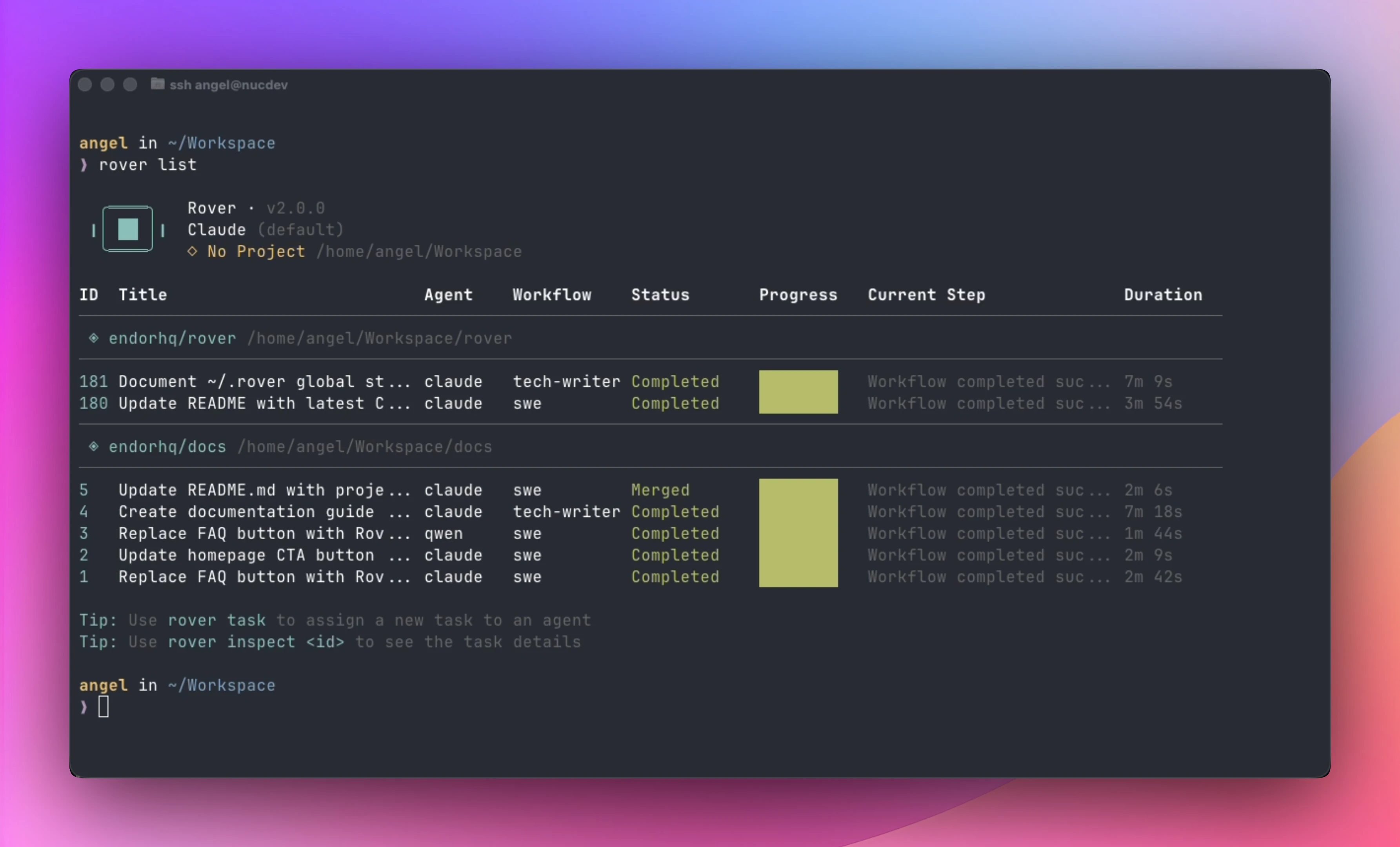
When you run any rover command, your project gets automatically registered in the global store. From that point, you can check or create tasks from any directory. You can also monitor all the tasks in different projects using the rover list command.
Better integration with Agent Client Protocol
Under the hood, Rover now uses the Agent Client Protocol (ACP) for Claude. ACP is an open standard for communicating with AI coding agents, developed initially by the Zed team. We believe ACP is the future of managing agents, as it provides a common abstraction to interact with them that gives developers the freedom to use any agent with their preferred tools.
Nothing has changed from an user perspective, but internally, Rover now consumes fewer tokens while being more robust than before. In upcoming releases, expect more coding agents supported and better visibility into what’s happening inside each task like agent reasoning and logs.
Custom workflows
As Anthropic’s engineering team noted, AI agents need structure to work effectively across extended tasks. They call this an “agent harness”, a framework that provides context, incremental progress, and clean state management. Without this structure, agents often attempt too much at once or leave broken intermediate states.
Rover workflows are a type of harness. They break complex tasks into incremental steps, provide full context at each stage, and ensure clean state through Git worktrees and automatic commits. This is why Rover-managed agents produce consistent, reliable results.
Until now, Rover shipped with built-in workflows like swe (software engineer) and tech-writer. With v2, you can extend these or create entirely new workflows tailored to your needs. The process is simple:
- Run
rover inspect workflow sweto see the built-in workflow structure - Create a
.rover/workflows/directory in your project - Add your custom workflow YAML file
# Basic metadata
name: security-review
description: Run a security review for a specific feature

# Inputs and outputs for this workflow
inputs: ...
outputs: ...

# Steps
steps:
  - name: analyze
    type: agent
    prompt: Review the codebase for security vulnerabilities...
  - name: report
    type: agent
    prompt: Generate a detailed security report...
  ....
Example use cases for customized workflows include security reviews, license compliance checks, documentation standards, and any process you want agents to follow consistently.
See the workflow guide to learn how to write your own workflows. It’s fun and easy!
Hooks system
The new hooks system connects Rover with your existing tooling. You can define custom scripts that run at key points in the task lifecycle: when a task completes, when changes are merged, or when code is pushed. We plan to add support for more events in upcoming releases.
Configure hooks in your rover.json:
{
  "hooks": {
    "onComplete": "./scripts/notify-slack.sh",
    "onMerge": "./scripts/close-issue.sh",
    "onPush": "./scripts/trigger-ci.sh"
  }
}
Rover passes environment variables to your scripts with task metadata, so you can build automations like creating PRs, sending notifications, or triggering CI pipelines.
See the hooks documentation for the full list of available variables.
Tracking GitHub issues
When you create a task from a GitHub issue using rover task --from-github, Rover now stores the issue metadata (number, URL, and reference). You can use this information in your hook scripts to automatically close issues on merge or update their status.
Learn more about working with GitHub issues.
We plan to support additional integrations for other issue tracking platforms.
Run AI agents securely
AI agents are powerful, but sometimes they can behave unpredictably. If you’re building automations that run unattended, guardrails are essential. Rover approaches security from two angles: where agents run (sandbox) and what they can see (workspace).
Sandbox hardening
By default, agents run inside containers with limited permissions. With v2, you can further restrict network access using an allowlist:
{
  "sandbox": {
    "network": {
      "allowlist": ["api.anthropic.com", "api.github.com", "registry.npmjs.org"]
    }
  }
}
This ensures agents can only reach the services they need while limiting resource consumption. See the sandbox configuration for all available options.
Exclude non-relevant and sensitive files
Even with a sandboxed environment, you may want to keep certain files away from AI agents entirely. They may be sensitive or might introduce undesired noise. The excludePatterns configuration removes files from the agent’s workspace. They simply don’t exist from the agent’s perspective:
{
  "excludePatterns": [".env", "secrets/", "*.pem"]
}
NOTE: From a security perspective, AI agents running in the sandbox won’t see these files. However, agents might still be able to read them through the git history outside of the sandbox.
See the project configuration for more details.
Join our community
We want to give special thanks to Ben Ullrich for his significant contributions to v2.0, including the hooks system, GitHub issue tracking, sandbox hardening, and exclude patterns. Rover is better because of contributors like him.
We’d love to hear how you’re using Rover. Join our community:
- GitHub: github.com/endorhq/rover for issues and discussions
- Discord: Join our Spaceship server to chat with the team
Next steps
We’re excited about what’s coming next. Our roadmap includes more integrations for building automations, support for additional AI agents, more workflow capabilities, and a new Firecracker backend for even faster sandbox initialization.
Follow us on X, Mastodon, or Bluesky to stay up to date.
Happy coding with Rover!
Ready to boost your AI coding agents?
Check out Rover on GitHub and the documentation to get started